


Organizations are investing heavily in mobile technology. Tablets, scanners, handheld computers, laptops, mobile printers, and other connected devices are becoming essential tools for frontline workers, warehouse teams, healthcare professionals, service technicians, and manufacturing personnel.
But there is one critical question that is often overlooked during technology deployments:
Where will these devices be stored, secured, charged, and managed when they are not in use?
Too often, businesses focus on selecting the right hardware while neglecting the workflow that supports it. The result is a deployment that creates new challenges instead of solving existing ones.
The Most Common Mistake: Buying Hardware Before Defining the Process
When organizations roll out new mobile devices, the conversation typically revolves around device specifications, software capabilities, and deployment timelines.
What often gets missed is the day-to-day process surrounding those devices:
- Who will use them?
- When will they be checked out?
- How will they be returned?
- Where will they be charged?
- Who is responsible for ensuring they are available and ready for the next shift?
- How will missing devices be tracked?
Without clearly answering these questions, even the most advanced technology investments can suffer from poor adoption and operational inefficiencies.
The reality is simple:
Device management is not just a storage problem—it is a workflow problem.
The Hidden Costs of Poor Device Management
Many organizations don’t realize how much time and money are lost through inefficient device handling.
Common challenges include:
- Devices disappearing between shifts
- Batteries not being fully charged when needed
- Employees spending valuable time searching for equipment
- Manual checkout logs and spreadsheets
- Lack of accountability for returned assets
- Delays caused by unavailable devices
These small inefficiencies quickly compound across an organization.
A few minutes spent searching for a scanner or waiting for a charged tablet may not seem significant, but multiplied across hundreds of employees and thousands of shifts, the cost becomes substantial.
Device Storage Should Be Part of the Workflow
The most successful organizations treat device storage and charging as an integrated part of their operational workflow.
Instead of asking:
“Where can we put these devices?”
They ask:
“How should devices move through our business?”
This perspective changes everything.
An effective workflow should enable:
- Secure device storage
- Automated check-in and check-out processes
- User accountability
- Continuous charging
- Asset visibility
- Reporting and audit trails
- Reduced administrative overhead
When these elements work together, devices are always ready, employees stay productive, and management gains visibility into asset utilization.
Integration Matters
Another common challenge occurs when device management exists separately from the systems employees use every day.
Without an integrated process, teams often resort to:
- Manual assignments
- Email notifications
- Spreadsheet tracking
- Paper sign-out sheets
- Administrative intervention
These processes introduce delays and opportunities for error.
A smarter solution allows device access, tracking, accountability, and reporting to become part of the standard workflow.
The goal is to remove friction—not create another administrative task.
Ownership Drives Results
Even the best technology can underperform if no one owns the process.
Organizations often find responsibility falling into a gray area:
- IT assumes Facilities is responsible.
- Facilities assumes Operations is responsible.
- Operations assumes IT is managing it.
The result is predictable:
- Limited reporting
- Minimal optimization
- Poor user adoption
- Reduced return on investment
Successful deployments assign clear ownership and establish measurable goals for device management performance.
Just like any other business process, device storage and charging should be monitored, measured, and continuously improved.
Why PT-PRO Locker Is the Right Foundation
As organizations expand their mobile technology fleets, they need more than a charging cabinet or storage locker.
They need a system that supports the entire device lifecycle.
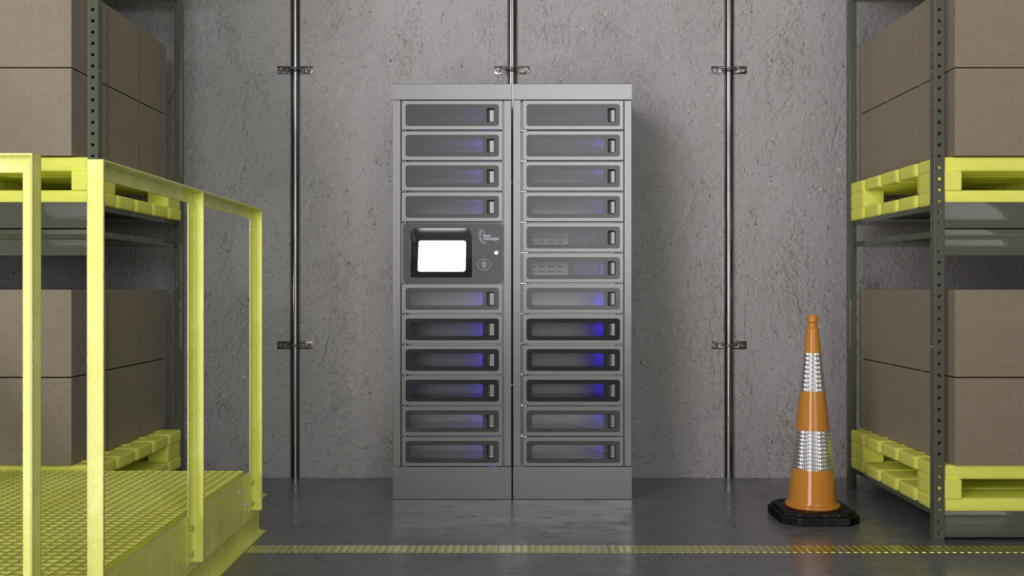
The PT-PRO Locker from Power Technologies was designed specifically to address these operational challenges by combining:
- Secure device storage
- Integrated charging capabilities
- Controlled user access
- Asset accountability
- Automated workflows
- Real-time visibility
Rather than functioning as a simple storage location, PT-PRO Locker becomes a critical part of an organization’s device management strategy.
Employees can quickly access the devices they need, return them safely, and ensure they remain charged and available for the next user.
Management gains confidence knowing assets are protected, tracked, and properly maintained.
Start with the Process
When introducing new mobile devices into your organization, don’t make the mistake of focusing exclusively on the hardware.
The real question isn’t what hardware to buy.
The real question is:
What process are you trying to improve?
Once you understand the workflow—from device assignment and charging to security and accountability—the right solution becomes clear.
The organizations that achieve the greatest return on their technology investments aren’t simply deploying more devices.
They’re building smarter processes around them.
And that’s exactly where PT-PRO Locker delivers value.
Ready to Build a Better Device Management Workflow?
Whether you’re deploying tablets, barcode scanners, mobile computers, laptops, or other critical devices, PT-PRO Locker helps ensure they are secure, charged, tracked, and ready when your team needs them.
Learn more about PT-PRO Locker at www.powertechnologies.com and discover how better workflows lead to better outcomes.